Renovar manualmente mis productos o servicios
Renueva manualmente tus productos en cualquier momento, incluso si están configurados en renovación automática.
Note: If you're looking to renew an expired domain, the steps are different.
- Ve a tu página de Renovaciones y Facturación y selecciona Administrar Suscripciones.
- In the Subscriptions list, select the product and then select Extend Term.
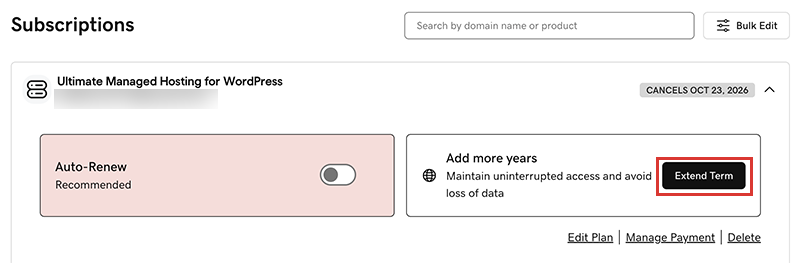
We'll take you to the Cart, where you can see the renewal price.Note: If you see Renew Now instead of Extend Plan, select Renew Now to confirm the payment method to use for the renewal. - Sigue las indicaciones para completar tu compra de renovación.
Note: Products auto-renew for the same length of time as their most recent manual renewal, instead of their original registration length. This also applies to domains that are manually renewed after July 16, 2020. For example, if a domain is manually renewed after July 16, 2020 for a three-year term, it will auto-renew for the same three-year term when the time comes. For full details, see our Domain Name Registration Agreement.
Pasos relacionados
- Te explicamos cómo renovar un dominio vencido.
- Activa la renovación automática para que no tengas que renovar tus productos manualmente.
- Or, cancel a subscription to turn off auto-renewals.
Más información
- Actualiza la información de tu método de pago: Cambia la fecha de vencimiento de tu tarjeta de crédito o tu dirección de facturación.